
Introduction to Ergonomic Workstations
In recent years, the concept of ergonomic workstations has gained significant traction, driven largely by the increasing prevalence of remote work. An ergonomic workstation is designed to promote comfort, efficiency, and productivity while prioritizing the user’s posture and physical well-being. The modern workforce has seen a shift from traditional office environments to home-based setups, which has underscored the necessity for ergonomic solutions. While the convenience of working from home is appealing, it often leads to poor posture, discomfort, and long-term health issues if proper tools are not utilized.
The central tenet of ergonomic design is to customize the workstation to fit the individual’s body dimensions and work habits, ultimately reducing strain on muscles and joints. For laptop users, this proves particularly important, as prolonged use can lead to awkward positioning, exacerbating issues like neck and back pain. The introduction of laptop stands is one effective way to achieve an ergonomic setup, allowing users to adjust their devices to eye level and maintain a neutral wrist position while typing. This adjustment minimizes the risk of repetitive strain injuries and enhances overall comfort during prolonged usage.

The Importance of Laptop Stands
In contemporary work dynamics, an ergonomic workspace is paramount, particularly for individuals who spend prolonged periods working on laptops. One of the essential components of achieving an ergonomic setup is the use of laptop stands. These devices significantly contribute to enhancing user comfort and overall productivity while mitigating health risks associated with poor posture.
One of the primary benefits of laptop stands is their ability to improve posture. When using a laptop directly on a table or a desktop, users often find themselves hunching over the screen, leading to strain in the neck and shoulders. A laptop stand allows for a higher screen positioning, promoting a more neutral neck and spine alignment. This adjustment helps users to maintain a comfortable posture, reducing the likelihood of developing musculoskeletal issues over time.
Furthermore, laptop stands aid in better alignment between the eyes and the screen. Ideally, the top of the laptop screen should be at or just below eye level, enabling users to gaze forward rather than down. This not only alleviates neck strain but also minimizes eye fatigue, which is prevalent when working for extended hours on a laptop.
In addition to promoting ergonomic posture, laptop stands assist in heat dissipation. Many laptops generate substantial heat during operation, which can lead to overheating and performance degradation. By elevating the device, laptop stands create better airflow around the laptop, facilitating cooling and enhancing the device’s longevity. Moreover, they can improve typing comfort by raising the keyboard to a more suitable angle, further encouraging proper wrist alignment during typing.
In summary, incorporating a laptop stand into a workspace is a crucial step towards establishing an ergonomic environment. By improving posture, enhancing screen alignment, aiding in heat management, and increasing typing comfort, laptop stands prove to be invaluable for anyone seeking to enhance their work experience while safeguarding their health.
Key Features to Consider When Choosing a Laptop Stand
When selecting a laptop stand, various features are vital in ensuring that it promotes an ergonomic workspace. One of the primary aspects to consider is portability. A laptop stand that is lightweight and compact is essential for individuals who work in multiple locations or travel frequently. Portability allows for easy transport, ensuring that you can maintain an ergonomic posture whether at home, in a café, or at the office.


Another crucial factor is height adjustability. A stand that offers various height options enables users to position their screens at eye level, reducing strain on the neck and promoting better posture. Flexibility in height settings allows for customization to individual preferences, which is crucial for long-term comfort during extended use. Additionally, the angle of the laptop stand should be adjustable; this adds versatility, catering to different activities such as typing, drawing, or reading.
Stability is also a key consideration when choosing a laptop stand. A stable stand prevents wobbling and movement, providing a solid base for your device. It’s essential to select a model that can securely hold the weight of your laptop, ensuring that it remains in place during use. Further, the quality of materials used in the construction of the stand contributes significantly to its overall durability and performance. High-quality materials withstand wear and tear, prolonging the lifespan of the product while supporting your laptop effectively.
Lastly, the design and additional features, such as cable management options or built-in cooling, can enhance the efficiency of a laptop stand. These elements not only improve aesthetics but also provide practical solutions for managing workspace clutter and overheating. By considering these key features, users can make informed decisions when selecting a laptop stand that aligns with their ergonomic needs.
Comparative Overview of Top Laptop Stands
When it comes to creating an ergonomic workspace, the choice of laptop stand can significantly impact both comfort and productivity. This overview examines three leading models: the Roost Laptop Stand, the Nexstand Laptop Stand, and the Rain Design mStand. Each of these laptop stands offers unique features and benefits tailored to different user requirements.
The Roost Laptop Stand is renowned for its lightweight design and portability, making it an excellent choice for those who frequently work on the go. Constructed from durable materials, the stand is designed to elevate the laptop to eye level, which helps in reducing neck and back strain. Its compact nature allows it to fold down neatly, fitting easily into a laptop bag. Users report a high degree of stability even when using larger laptops, making it a popular option among remote workers.

- V3 Plus: Go Higher and Lower – Now with 11 height settings for even higher “eye line” and less hunching. Screen Lift: 5–…
- Quick-Release Adjustment – New on the V3 Plus – Change height without removing your laptop—perfect for working anywhere….
- Zero Flex, Perfectly Still Screen – No more screen shake from wobbly and rotating-base stands. The Roost’s interlocking …
The Nexstand Laptop Stand emphasizes adaptability and adjustability. This model offers multiple height settings, catering to diverse user preferences and contributing to optimal ergonomic positioning. Made from sturdy materials, the Nexstand provides strong support even during vigorous typing sessions. Its foldable design ensures easy portability, appealing particularly to those who travel frequently. Reviews highlight its versatility, suitable for various uses from casual browsing to intensive work sessions.
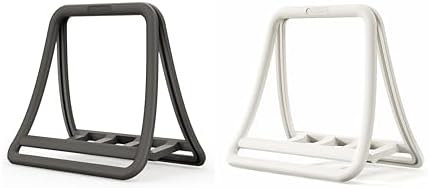
- Optimize Your Workspace: Place your laptop or Macbook on the docking station to save precious desk space and protect you…
- Automatic Locking: The vertical laptop stand automatically grips the laptop once it is placed in the stand.
- Instant Setup with Ease: No tools needed.Simply dock and install in a flash.
On the other hand, the Rain Design mStand showcases a more fixed and elegant approach. Primarily crafted from aluminum, the mStand offers superior durability and features a solid base for enhanced stability. Designed with a focus on aesthetics, it complements both home and office environments while effectively elevating the laptop to a comfortable height. The ventilation design is a noteworthy benefit, promoting heat dissipation. However, it is less portable compared to the previously mentioned models, making it more suitable for stationary setups.

In summary, each laptop stand presents distinct advantages catering to individual needs. The Roost emphasizes portability, the Nexstand offers versatility, and the Rain Design mStand focuses on aesthetics and stability, providing users with significant choices to enhance their ergonomic workspace.
Roost Laptop Stand: Design and Usability
The Roost Laptop Stand is designed with portability and ergonomics in mind, making it an ideal accessory for individuals who require a versatile solution for their workspace. Constructed from high-quality materials, the stand boasts a robust design that ensures stability while holding a laptop securely, even during active use. Its minimalistic yet sturdy framework allows it to withstand the rigors of travel, making it a popular choice among professionals on the move.
One of the key features of the Roost Laptop Stand is its height adjustability. This feature enables users to elevate their laptop to eye level, promoting better posture and reducing strain on the neck and shoulders. The stand accommodates a variety of laptop sizes and offers multiple height settings, making it suitable for users of different heights and preferences. This adaptability is particularly beneficial for those who switch between sitting and standing while working.
In addition to its ergonomic benefits, the Roost Laptop Stand is lightweight and collapsible, which enhances its portability. Weighing just a few ounces, it can easily fit into most laptop bags, making it a convenient choice for traveling professionals. Whether one is working at a café, in an airport, or at a client’s office, the Roost stand can be quickly set up to create an ergonomic workspace anywhere.
The usability of the Roost Laptop Stand extends beyond its physical attributes. Its design also encourages the incorporation of external peripherals, such as keyboards and mice, further enhancing the ergonomic benefits. This allows users to create a comfortable and functional workspace that maximizes productivity without compromising health. Overall, the Roost Laptop Stand represents a harmonious blend of design, quality, and usability, catering effectively to both stationary and mobile work environments.
Nexstand Laptop Stand: Features and Performance
The Nexstand Laptop Stand is a highly regarded accessory for individuals seeking to enhance their ergonomic workspace. One of its standout features is its significant adjustability; the stand offers a range of height settings that can accommodate users of various heights and preferences. This flexibility allows for customization, ensuring that anyone can achieve an optimal viewing angle that minimizes neck and eye strain during prolonged use.
- Optimize Your Workspace: Place your laptop or Macbook on the docking station to save precious desk space and protect you…
- Automatic Locking: The vertical laptop stand automatically grips the laptop once it is placed in the stand.
- Instant Setup with Ease: No tools needed.Simply dock and install in a flash.
In terms of design, the Nexstand is both compact and lightweight, making it an ideal choice for those who require a portable solution. Weighing just over one pound, it is easily transportable and can be quickly set up without any tools. Users can set it up in seconds and dismantle it just as easily, which is especially beneficial for those who commute or travel frequently for work. Its folding design enhances portability while ensuring that users can maintain an ergonomic posture regardless of their location.
The Nexstand also touts impressive weight capacity, supporting laptops up to 20 pounds. This strength contributes to its overall stability during use. Users can feel confident that their devices will remain securely in place, whether they are typing intensely or navigating through tasks. Moreover, the structure comprises high-quality materials designed to withstand daily wear and tear, further increasing its longevity.
Ideal scenarios for the Nexstand’s use include home offices, co-working spaces, or even while traveling. For professionals who spend hours on their laptops, the Nexstand effectively elevates devices to eye level, promoting better posture and comfort. Overall, the Nexstand Laptop Stand is a practical investment for anyone looking to improve their workspace ergonomics without sacrificing convenience or performance.
Rain Design mStand: A Classic Approach
The Rain Design mStand is widely recognized for its iconic and minimalistic aesthetic, making it a favorite among professionals seeking an ergonomic workspace solution. Crafted from high-quality aluminum, this stand not only provides durability but also ensures effective heat dissipation. The open back design facilitates airflow around the laptop, which can help in maintaining optimal operating temperatures during prolonged use.
One of the standout features of the mStand is its elevated height, which raises the laptop screen to eye level, promoting better posture and reducing neck strain. This ergonomic advantage makes it particularly suitable for stationary setups, where users spend extended periods working on their devices. With an inclination designed to support a more natural typing angle, the mStand minimizes the risk of wrist strain, allowing individuals to work comfortably for longer durations.
In terms of practicality, the Rain Design mStand is compatible with various laptop sizes and provides a sturdy base that ensures stability during use. Its sleek and professional design allows it to seamlessly integrate into any office or home workspace, contributing to a neat and organized environment. Although it excels in fixed setups, the mStand may not be the best choice for users who require a portable solution. While its lightweight nature allows for some degree of mobility, it is best utilized in places where the laptop will predominantly remain stationary.
Ultimately, the Rain Design mStand represents a classic approach to ergonomic laptop use, balancing aesthetics and functionality. Its material construction, efficient heat dissipation capabilities, and ergonomic design make it an excellent choice for individuals seeking a reliable and effective stand for their workspace needs.
Comparison Chart: Key Specifications
When selecting a laptop stand to enhance your ergonomic workspace, understanding the key specifications of various models can make a significant difference. Below, we provide a comparison chart that lists important metrics such as weight, dimensions, adjustability, and material types for three standout laptop stands in the market.
This chart serves as a quick reference for individuals looking to find the most suitable option based on their specific needs. For those who prioritize a lightweight design, the FlexiStand 7 offers the lowest weight without sacrificing stability. Conversely, the ErgoLift 3000 provides the highest adjustability, catering to users who require flexibility in their workspace setup. The ApexStand Pro, with its robust aluminum construction, strikes a balance between weight and durability, making it an excellent choice for frequent travelers.
Overall, this comparison drives home the importance of evaluating specifications in response to individual requirements for an ergonomic laptop stand. Engaging with this chart not only aids in informed decision-making but also helps ensure that the chosen product aligns with personal work habits and ergonomic needs.
Conclusion: Choosing the Right Laptop Stand for You
As we have explored, selecting the appropriate laptop stand is an essential component of creating an ergonomic workspace. An effective laptop stand promotes proper posture, reduces the risk of strain on the neck and back, and ultimately contributes to enhanced productivity. Each individual’s workspace needs may vary, thus understanding the different types of laptop stands available will aid in making an informed choice.
For individuals who frequently travel, a lightweight and portable laptop stand is vital. Such stands are designed to be compact and easy to carry while ensuring that they provide adequate height adjustments to maintain healthy posture during use. Options in this category often emphasize adaptability and convenience, allowing users to transition seamlessly between various locations, be it a café or a co-working space.
If your primary use is in an office setting, consider a more robust and adjustable laptop stand that can accommodate multiple screen heights and angles. This type allows for a customized setup, promoting optimal ergonomic alignment with additional features such as cable management and extra storage space. Enhanced stability and ease of adjustment are critical in office environments where users may spend several hours at their desks each day.
For home use, a laptop stand that integrates with your existing desk setup can play a significant role in achieving a balanced working environment. Look for stands that complement your home aesthetics while providing adequate support for long-term use. This might include options with built-in cooling fans to enhance laptop performance and prevent overheating, or ergonomic designs that easily accommodate external peripherals such as keyboards and mice.
Investing in a quality laptop stand is not merely a purchase; it is an investment in your health and productivity. By considering your specific requirements, whether for travel, office, or home use, you can make a choice that ultimately enhances your working experience and nurtures both comfort and efficiency.