
Introduction
In the world of gaming, the display is an essential component that can significantly influence the overall experience. The effectiveness of a gaming setup depends largely on the quality of the monitor. Therefore, it is crucial for gamers to choose the right gaming monitor that aligns with their preferences and meets their performance needs. The market offers a plethora of options, each boasting cutting-edge technology and enhanced features aimed at elevating gameplay. This blog post aims to provide an in-depth comparison of three highly regarded models: the LG UltraGear 27GP850, Samsung Odyssey G7, and Acer Nitro XV272U.
The LG UltraGear 27GP850 is known for its impressive color accuracy and fast response time, making it an excellent choice for esports enthusiasts. Featuring a 27-inch IPS panel with a 1440p resolution, this monitor promises vibrant visuals and fluid performance. Next, we have the Samsung Odyssey G7, a powerhouse that combines a 240Hz refresh rate with a 1ms response time, ideal for competitive gaming. This monitor also features a curved display that enhances immersion, making it a favorite among gamers who enjoy a more enveloping experience. Lastly, the Acer Nitro XV272U stands out with its versatile feature set, including Adaptive Sync technology, which helps reduce screen tearing, along with HDR support for those seeking sharp and realistic visuals.
Through this comparison, we will examine critical parameters such as display quality, refresh rates, ergonomic design, and additional features offered by each monitor. By the end of this analysis, readers will gain valuable insights into which monitor may best serve their gaming needs, paving the way for an informed purchase decision. Stay tuned as we delve deeper into the specifics of these three noteworthy contenders in the gaming monitor arena.
Refresh Rate and Response Time
When selecting a monitor for gaming, the refresh rate and response time are critical specifications that significantly influence the overall experience. Each of the monitors in this comparison—LG UltraGear 27GP850, Samsung Odyssey G7, and Acer Nitro XV272U—brings unique characteristics to the table that can enhance gameplay, particularly in fast-paced scenarios.
The refresh rate, measured in hertz (Hz), indicates how many times a monitor can refresh the image per second. The LG UltraGear 27GP850 supports a refresh rate of 144Hz, which is quite substantial for most gaming needs. The Samsung Odyssey G7 takes it up a notch with an impressive 240Hz capabilities, effectively allowing smoother motion and reducing blurring during rapid movements. Meanwhile, the Acer Nitro XV272U also offers a competitive refresh rate of 165Hz, ensuring it remains a viable option for gamers seeking a responsive display.
Response time, on the other hand, refers to how quickly a pixel can change from one color to another, significantly impacting how motion is perceived on screen. The LG UltraGear 27GP850 boasts a 1ms response time, providing crisp visuals even in the most action-packed sequences. The Samsung Odyssey G7 matches this response time, which is especially appealing for competitive gamers who require instantaneous feedback. The Acer Nitro XV272U, while slightly slower with a 3ms response time, still performs admirably for many gaming scenarios.
In summary, while all three monitors offer impressive refresh rates and response times, the Samsung Odyssey G7 holds the advantage in refresh rate, potentially offering the smoothest experience during high-octane gaming sessions. Gamers should consider their specific needs and preferences when determining which specifications are essential for their gaming style.
Panel Type and Viewing Angles
When evaluating the LG UltraGear 27GP850, Samsung Odyssey G7, and Acer Nitro XV272U, the panel type plays a crucial role in determining visual performance. The primary panel technologies employed in these monitors are In-Plane Switching (IPS) and Vertical Alignment (VA). Each technology offers distinct advantages and drawbacks that can affect user experience in various settings.

- LG USA AUTHORIZED – Includes 2 Year Extended Protection Plan in ADDITION to the Included FULL Manufacturer Protection
- LG 27GP850-B 27″ UltraGear QHD (2560 x 1440) Nano IPS Gaming Monitor + AMD FreeSync
- IPS 1ms (GtG) Response Time and 165Hz Refresh Rate (O/C 180Hz) | NVIDIA G-SYNC Compatible with AMD FreeSync Premium | DC…
IPS panels, like the one found in the LG UltraGear 27GP850, are renowned for their exceptional color reproduction and wide viewing angles. These panels provide consistent colors, even when viewed from sharp angles, making them ideal for creative professionals and gamers who demand accurate color representation. The drawback, however, lies in their comparatively slower response times, which can lead to motion blur during fast-paced gaming scenarios. Nevertheless, the color consistency and superior viewing angles often outweigh these downsides for many users.
On the other hand, the Samsung Odyssey G7 utilizes a VA panel, which excels in contrast ratios and deeper blacks. This characteristic is particularly beneficial for gamers who appreciate immersive experiences, especially in darker scenes. However, VA panels typically exhibit narrower viewing angles compared to IPS, which can lead to color shifting and decreased image quality when viewed from the side. Therefore, while the Samsung Odyssey G7 offers stunning visuals and high contrast, its performance may vary based on the viewer’s position relative to the screen.

- Samsung’s 27″ Odyssey G7 4K / FHD Gaming Monitor delivers stunning visuals and lightning-fast action.
- Dual mode enables effortless toggling between resolutions and refresh rates with a choice of 180Hz in 4K UHD or 360Hz in…
- Fast IPS panel accurately delivers clear, crisp hues that stay consistent across the whole screen.
The Acer Nitro XV272U, another strong contender, utilizes an IPS panel, balancing color accuracy and responsiveness. It aims to combine the advantages of both panel technologies, offering good viewing angles and decent response rates. When evaluating monitors, understanding these panel types will guide users to make informed choices based on their specific needs for gaming, professional work, or multimedia consumption.
Color Accuracy and Calibration
In today’s digital landscape, the need for exceptional color accuracy is paramount, particularly for professionals engaged in graphic design, video editing, and photography. The LG UltraGear 27GP850, Samsung Odyssey G7, and Acer Nitro XV272U all strive to provide a superior viewing experience, each showcasing unique strengths in color performance and calibration.
The LG UltraGear 27GP850 is notable for its wide color gamut, covering 98% of the DCI-P3 spectrum, which is essential for content creators who require precision in color rendition. In addition to its impressive gamut, the pre-calibrated accuracy achieves a Delta E value of less than 2, making it an excellent choice for those who prioritize out-of-the-box performance. The monitor features built-in calibration tools that simplify the adjustment process, allowing users to achieve optimal accuracy with ease.

- Ascend your game with the speed of UltraGear – Experience next-level QHD gaming performance.
- 200Hz Refresh Rate & 1ms MBR – Gear up for smooth gameplay at up to 200Hz refresh rate and 1ms GtG. The faster speed and…
- NVIDIA G-SYNC Compatible and AMD FreeSync – Officially validated by NVIDIA as G-SYNC Compatible and equipped with AMD Fr…
On the other hand, the Samsung Odyssey G7 offers an equally compelling color performance with its 95% coverage of the DCI-P3 color space. It is particularly renowned for its vibrant and striking colors, which enhance gaming experiences significantly. The G7 comes pre-calibrated, but it does allow for further adjustments through Samsung’s intuitive software, offering users the ability to fine-tune settings to their precise specifications. This flexibility is beneficial for professionals looking for that final layer of accuracy.
Lastly, the Acer Nitro XV272U presents a commendable alternative, boasting a color gamut of 95% DCI-P3 coverage as well. Its factory calibration also yields a Delta E value under 2, signifying reliable color accuracy straight out of the box. The inclusion of several color modes contributes to its versatility, allowing users to adjust performance according to different applications effortlessly.
Ultimately, each monitor provides robust options for calibration and stunning color accuracy, catering to the specific needs of professionals and enthusiasts alike.
HDR Performance
High Dynamic Range (HDR) performance is a critical factor for gamers seeking immersive visuals, and each of the monitors in this comparison – the LG UltraGear 27GP850, Samsung Odyssey G7, and Acer Nitro XV272U – offers distinct strengths in this regard. The LG UltraGear 27GP850 provides a peak brightness of up to 144 nits, combined with an impressive contrast ratio of 1000:1, which allows for decent HDR content rendering. However, its HDR capabilities may not be as pronounced as the other contenders, often resulting in a less vibrant experience when playing HDR games.
In contrast, the Samsung Odyssey G7 excels with its high peak brightness of approximately 600 nits and a contrast ratio of 2500:1, affording it the ability to display bright highlights and deep shadows effectively. This level of brightness significantly enhances the HDR experience, showcasing bright, vivid colors and facilitating a more dynamic range that is often sought after by gamers. Such characteristics make the Odyssey G7 a compelling choice for those looking to maximize their immersion in HDR-enabled games.
The Acer Nitro XV272U also presents commendable HDR performance, achieving peak brightness levels around 400 nits and a contrast ratio of 1000:1. While the brightness efficiency is respectable, it does not reach the same levels as the Odyssey G7, which may limit its ability to exhibit the full potential of HDR content. As a result, while the Nitro offers an acceptable HDR experience, the overall effectiveness might fall short compared to its peers.
Overall, while all three monitors demonstrate HDR capabilities to varying degrees, the Samsung Odyssey G7 stands out as the leader in delivering a superior HDR performance for gamers, characterized by its exceptional peak brightness and contrast ratio, which enhances the overall gaming experience significantly.
Ergonomics and Design
When evaluating gaming monitors, ergonomics and design play a pivotal role in enhancing user comfort, particularly during extended usage. The LG UltraGear 27GP850, Samsung Odyssey G7, and Acer Nitro XV272U each showcase distinct design philosophies and ergonomic features that cater to different user preferences.

- Vivid Color, Fast Response, Total Control – The 27″ UltraGear QHD (2560 x 1440) IPS gaming monitor delivers vivid VESA D…
- QHD Clarity, Bold Colors, and DisplayHDR 400 Brilliance – Bold QHD on a 27” IPS display with up to 99% sRGB color covera…
- Blazing 200Hz Speed. Every Frame Counts. – Enjoy fluid, crystal-clear gameplay with a fast 200Hz native refresh rate. Mi…
The LG UltraGear 27GP850 is designed with a sleek aesthetic, featuring a slim bezel that maximizes the screen space for an immersive gaming experience. Its stand allows for a wide range of adjustments, including height, tilt, and swivel, enabling users to find the optimal viewing position. This flexibility is crucial for gamers who may spend long hours in front of the screen, as it helps reduce neck and back strain.
In contrast, the Samsung Odyssey G7 takes a more aggressive design approach with its curved screen, which not only adds a unique visual appeal but also enhances immersion. The stand is also highly adjustable, supporting height, tilt, and pivot modifications. One standout feature of the Odyssey G7 is its picture-by-picture mode, allowing users to multitask efficiently without sacrificing comfort. The build quality is robust, reinforcing its premium feel while ensuring stability during intense gaming sessions.
The Acer Nitro XV272U presents a more straightforward, professional design that appeals to both gamers and office users. Its stand provides comprehensive adjustability options, including height, tilt, and swivel, promoting ergonomic setups that encourage healthy posture. The monitor’s build quality is commendable, with a sturdy framework that minimizes vibrations, ensuring that users can fully immerse themselves in their gaming without distraction. Overall, each monitor demonstrates thoughtful ergonomics and design, significantly influencing user experience during prolonged gameplay.
Brightness Levels
The maximum brightness levels of monitors play a crucial role in both HDR performance and visibility across different lighting conditions. In this comparison, we will examine the LG UltraGear 27GP850, Samsung Odyssey G7, and Acer Nitro XV272U to determine how their brightness outputs affect user experience. Understanding the brightness specifications of these monitors can guide consumers in selecting a product that meets their specific requirements.
The LG UltraGear 27GP850 boasts an impressive peak brightness of up to 600 nits when utilizing HDR, making it suitable for gamers and content creators who demand vibrant visuals. This high brightness level enhances the contrast between light and dark areas, thereby improving the overall image quality and making the HDR experience more immersive.
In contrast, the Samsung Odyssey G7 offers a peak brightness of around 1000 nits, positioning it as a strong contender for HDR content. This elevated brightness enhances visibility in brightly lit environments, thereby allowing users to enjoy more detailed visuals and a more authentic gaming experience. Furthermore, the high level of brightness enables the Odyssey G7 to showcase vivid colors and high contrast ratios, making it ideal for dynamic gaming environments.
The Acer Nitro XV272U, while still competitive, features a peak brightness of 400 nits in HDR mode. Although it may not match the levels of the LG or Samsung monitors, it still provides adequate brightness for typical gaming and multimedia use. With its decent brightness performance, the Nitro XV272U can deliver satisfactory visuals, especially in dimmer settings.
In summary, when considering brightness levels, the Samsung Odyssey G7 stands out with its exceptional peak brightness, followed closely by the LG UltraGear 27GP850. The Acer Nitro XV272U, although slightly lower, still provides a competent performance. The difference in brightness levels can significantly impact HDR performance and visibility, making it an essential factor when choosing the right gaming monitor.
Cgaming Capabilities
In the competitive realm of gaming monitors, the capabilities of each display can significantly impact the overall gameplay experience. The LG UltraGear 27GP850 stands out with its compatibility with both NVIDIA G-Sync and AMD FreeSync technology. This dual support allows gamers to enjoy tear-free and smooth visuals regardless of their GPU choice. The monitor also features a dynamic refresh rate that can scale from 48 Hz to 165 Hz, making it suitable for high-action gaming scenarios where frame rates fluctuate.
The Samsung Odyssey G7 presents a robust offering for gamers as well. It incorporates a 240 Hz refresh rate alongside G-Sync compatibility, making it an excellent choice for competitive gaming. Moreover, the Odyssey G7 features a technology called QHD, which enhances the visual fidelity and provides deeper contrasts. The monitor also includes various gaming modes that optimize settings based on different gaming genres, allowing players to fine-tune their experience for titles ranging from first-person shooters to racing games.
On the other hand, the Acer Nitro XV272U also offers commendable gaming functions, supporting AMD FreeSync Premium and featuring a refresh rate of up to 144 Hz. Although it does not reach the high frequencies that the Odyssey G7 boasts, its IPS panel guarantees wide viewing angles and vibrant color reproduction, crucial for immersive gaming experiences. The Nitro XV272U includes several pre-configured gaming profiles, making it easier for users to switch between settings tailored for different types of games quickly.
All three monitors—LG UltraGear 27GP850, Samsung Odyssey G7, and Acer Nitro XV272U—are designed with gamers in mind, but they each offer unique features that cater to different preferences and playing styles. Evaluating these gaming capabilities allows consumers to make an informed choice aligned with their specific gaming needs.
Pros and Cons
When considering the optimal choice for a gaming monitor, it is essential to weigh the strengths and weaknesses of each model. Here is a breakdown of the pros and cons for the LG UltraGear 27GP850, Samsung Odyssey G7, and Acer Nitro XV272U.
LG UltraGear 27GP850
Pros:
- High resolution of 2560 x 1440 provides excellent image clarity, making it ideal for gaming and content creation.
- IPS panel technology ensures vibrant colors and wide viewing angles, enhancing the overall visual experience.
- Support for variable refresh rates (VRR) improves gameplay smoothness, reducing screen tearing.
Cons:
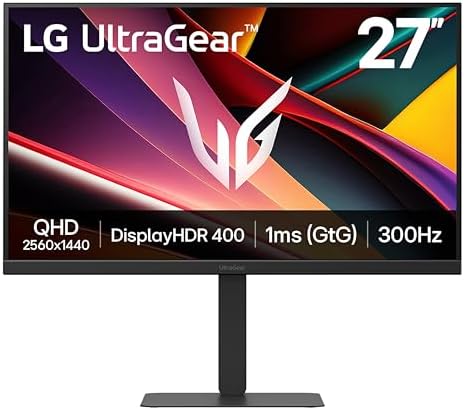
- Blazing Speed. Brilliant Color. Total Control. – Dominate the game with a 27″ QHD IPS display built for speed, clarity, …
- 27″ QHD IPS Clarity – Enjoy crisp, detailed visuals with QHD (2560×1440) IPS resolution on a vibrant 27″ IPS display. Wi…
- Vivid Color and HDR Brilliance – Immerse yourself in lifelike visuals with up to 95% DCI-P3 color gamut and VESA Display…
- Some users might find that the response time is not as low as competitors, potentially affecting fast-paced gaming.
- Price point may be higher compared to other monitors with similar specifications, limiting options for budget-conscious buyers.
Samsung Odyssey G7
Pros:
- Curved QLED display offers an immersive gameplay experience, drawing players deeper into the action.
- Excellent refresh rate of 240Hz provides smooth motion and responsiveness for competitive gaming.
- G-Sync and FreeSync compatibility helps eliminate screen tearing and enhances gaming performance.
Cons:

- BOOST YOUR REALITY: QHD resolution packs 1.7x the pixel density of Full HD and boasts detailed, pin-sharp images; Fast I…
- REACT IN REAL TIME: Speed through scenes; 180Hz refresh rate eliminates lag for exhilarating gameplay with ultrasmooth a…
- SHED NEW LIGHT ON HIDDEN DETAILS: VESA DisplayHDR 400 delivers more contrast, with deeper blacks and brighter whites, to…
- The curvature may not suit all users, particularly those who prefer a flat screen for various tasks.
- Limited brightness performance in some settings can hinder visibility in well-lit environments.
Acer Nitro XV272U
Pros:
- Offers great value for the specifications provided, which appeals to cost-effective buyers.
- Supports 144Hz refresh rate and 1ms response time, making it favorable for competitive gaming.
- Flexible ergonomic design with height, tilt, and swivel adjustments enhances comfort during use.
Cons:
- Color accuracy may not match that of higher-end models, which could be a drawback for professional creators.
- Limited HDR performance may result in less dynamic range and vibrancy compared to other monitors.
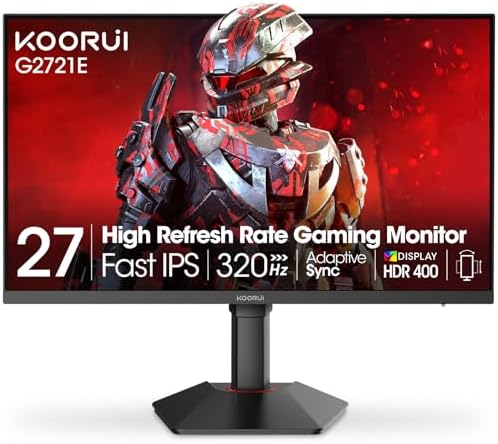
- 320Hz Ultra-Smooth Gameplay: Dominate every match with the KOORUI 27 inch gaming monitor featuring an industry-leading 3…
- QHD & Fast IPS Display: Experience breathtaking clarity and color with QHD 2560×1440 resolution and advanced Fast IPS pa…
- 98% DCI-P3 & HDR400: The KOORUI 27 inch gaming monitor covers 98% DCI-P3 for cinema-quality color and supports HDR400 fo…
By considering these pros and cons, potential buyers can make a more informed decision when choosing their next gaming monitor.
User Verdict and Recommendations
When it comes to selecting a gaming monitor, personal experiences and preferences play a critical role in decision-making. In the case of the LG UltraGear 27GP850, many users have highlighted its exceptional color accuracy and response time as significant advantages. The IPS panel ensures stunning visuals, making it a popular choice among gamers who prioritize visual fidelity. Reviews frequently commend this model for its seamless performance in fast-paced games, making it an excellent option for competitive gaming where every millisecond counts.
On the other hand, the Samsung Odyssey G7 has received rave reviews for its immersive curved display and outstanding contrast. Gamers who immerse themselves in extensive gaming sessions appreciate the G7’s vibrant colors and deep blacks, enhancing the overall gaming experience. Moreover, the monitor’s high refresh rate and effective adaptive sync technologies are often pinpointed as key benefits that cater to both casual and serious gamers alike. Users often recommend this monitor for gamers who enjoy rich graphics and a more engaging setup.
The Acer Nitro XV272U offers an appealing balance between performance and price. Feedback generally indicates satisfaction with its solid build quality and decent response times, making it a versatile choice for gamers on a budget. Users frequently mention the value it provides in terms of features relative to its cost, appealing to those who want good performance without breaking the bank. Additionally, it is often recommended for individuals who desire a 1440p resolution without a steep investment.
Considering these varying perspectives, potential buyers should evaluate their specific gaming needs. Preferences such as image quality, refresh rates, and budget constraints will guide the decision in choosing among the LG UltraGear 27GP850, the Samsung Odyssey G7, and the Acer Nitro XV272U. Each monitor excels in particular aspects, thus catering to a wide audience of gamers.